What is a Trojan Horse Virus? Definition, Examples & How to Stop One
A Trojan horse virus (also known as Trojan malware) is malicious software that is disguised as a legitimate program, application or file to trick you (or a member of your team) into installing it.
One of the most serious versions is called a remote access Trojan (RAT), which gives the attacker unauthorised control of your system. This type of Trojan horse virus has been the attack vector for many recent reported attacks, and February 2026 brought a stark reminder of just how dangerous this threat remains, with security researchers identifying two new RAT families capable of operating entirely below the radar of traditional antivirus tools.
Trojan horse viruses remain relevant today because they often bypass traditional cyber security defences and can lead to significant data loss, operational disruption, or regulatory non-compliance.
In this article, we’ll explain exactly what a Trojan horse virus is, how Trojan malware works, how to detect and respond to an infection, and how your organisation can prevent a Trojan horse virus attack in the first place. We’ll also take a close look at two newly discovered RATs that reinforce why behaviour-based detection is no longer optional.
Key Takeaways
- A Trojan horse virus is malware disguised as legitimate software to enter your system undetected.
- Unlike viruses, Trojans do not self-replicate; they rely on deception and user interaction.
- Attackers use methods such as phishing emails, malicious adverts or software bundling to deliver Trojan malware into your systems.
- Once inside, Trojans may act as backdoors, steal data, install further malware, or give remote access via a RAT.
- In February 2026, security researchers identified two new RATs, Moonrise and Karsto, both carrying zero detections on VirusTotal at the time of discovery, confirming that signature-based defences alone are no longer sufficient.
- Differentiating the types, such as remote access Trojans (RATs), banking Trojans, droppers, backdoors, and rootkits, helps you prioritise your defence activities.
- Detection is particularly challenging for Trojan horse threats; effective defence includes security hygiene, layered technical controls, and 24/7 monitoring by a SOC.
- Partnering with an MSSP offering around-the-clock monitoring and incident-response capability significantly strengthens your cyber resilience.

What is a Trojan Horse Virus?
The definition of a Trojan horse virus is malware disguised as something harmless, like a legitimate software download, to trick a user into installing it.
From an operations perspective, you need to treat Trojans not just as an endpoint infection, but as a serious risk vector into your wider network, data stores, and critical systems.
Trojan horse meaning in computer terms
In computing terms, a “Trojan horse” (or simply Trojan) is defined as malicious software that misleads users about its true purpose by presenting itself as normal, benign software. However, when executed, it activates a hidden payload such as a backdoor, data stealer, or control agent.
This definition comes from the ancient Greek story of the wooden horse used to infiltrate the city of Troy. It was disguised as a gift but actually contained a surprised attack, which is why the meaning of Trojan horse in computer terms refers to a virus using a similar technique.
It’s important to note that while people often refer to a “Trojan virus” or “Trojan horse virus”, the correct technical term is “Trojan malware”, because unlike a virus, it does not replicate itself across files or systems automatically.
How does a Trojan differ from other malware?
You need to be able to spot the difference between a Trojan horse virus and other malware-based attacks; the attack vector changes how you defend your organisation.
A virus attaches itself to files or programs and then self replicates. A worm spreads across your network on its own. A Trojan, on the other hand, relies on you or your users taking an action before it can run.
Where a worm or virus may spread noisily and quickly, a Trojan is more likely to sit quietly in the background, creating a backdoor into your environment or slowly exfiltrating data instead of racing to infect everything it can.
From a risk management perspective, this is what makes Trojans so dangerous to both your operations and your organisation as a whole. Their stealth and persistence mean that they can slip past your perimeter controls and embed themselves deep inside your business long before anyone realises that something is wrong.
Comparing Trojans with Other Malware Types
| Trojan | Virus | Worm | Ransomware | Spyware | |
| How it spreads | Relies on user deception or manual installation | Attaches to legitimate files and self-replicates | Spreads automatically across networks | Often delivered via phishing or Trojans | Installed covertly with other software |
| User interaction needed | Yes | Sometimes | No | Usually yes | Usually no |
| Primary objective | Create back-door access, steal data, install other malware | Corrupt or modify files and applications | Replicate rapidly and cause disruption | Encrypt data for ransom | Collect information without consent |
| Speed of impact | Slow and stealthy | Moderate | Fast and noisy | Immediately upon activation | Continuous monitoring |
| Ease of detection | Difficult – often hides in plain sight | Easier once infected files are detected | Easy – rapid propagation noticeable | Noticeable – files locked or encrypted | Hard – operates silently |
| Business risk | Data theft, espionage, compliance breach | System instability, data loss | Network disruption, downtime | Data unavailability and ransom costs | Data privacy violations, regulatory penalties |
By understanding these distinctions, you can better prioritise your cyber defences. Trojans deserve particular attention because their quiet infiltration and persistence mean that they often act as the first stage of a larger, more damaging attack.
How Does a Trojan Horse (Trojan Malware) Work?
Understanding how Trojan malware works means that you can map your controls more effectively.
The typical journey of Trojan malware consists of these 4 steps:
- Entry
- Execution
- Impact
- Propagation within your environment
Common attack vectors and infection methods
Trojans are spread primarily via social engineering rather than automated infection. Common vectors include:
- Phishing emails with attachments or links that appear legitimate but deliver the Trojan payload.
- Fake software downloads or software updates from malicious or compromised sites.
- Malvertising and compromised adverts are directing users to download or execute malicious code.
- Removable media or file sharing in environments with weak controls that allow a Trojan to be introduced into the network.
What happens after infection? Payloads and attacker goals
Once installed, the Trojan’s behaviour can vary widely depending on its purpose.
Typical goals for attackers targeting business environments include:
- Establishing a backdoor or remote access channel (especially via a RAT), so that the attacker can perform lateral movement, escalate privileges, or exfiltrate sensitive data.
- Data theft includes credentials, intellectual property, financial information, and customer data.
- Installing further malware such as ransomware, spyware, or keyloggers.
- Disruption of operations, deletion or modification of data, or using the compromised systems as a botnet.
Understanding your business risk is key: a Trojan infection can compromise your compliance posture, damage your reputation, and create sizeable incident response costs if you’re not prepared.
Examples of real world Trojan malware attacks
You don’t have to look too far to see how damaging Trojans can be in the real world. Understanding how they have already affected other organisations and knowing how the same tactics could be used against you is key to implementing the right defensive measures to mitigate the risk of Trojan horses.
One of the most well known examples of a Trojan is the Zeus banking Trojan (also known as Zbot). It’s been used for years to steal online banking credentials through man-in-the-browser (MiTB) attacks, silently capturing customer login details and financial information as users access legitimate banking portals.
Zeus has evolved into countless variants, many of which still circulate today, targeting both individuals and corporate finance systems.
In recent years, remote access Trojans (RATs) have become a favourite tool for attackers, and they remain one of the most common starting points for ransomware and data exfiltration incidents worldwide. Once installed, a RAT gives cybercriminals ongoing access to your systems, letting them browse files, steal data, deploy additional malware, or prepare the groundwork for a ransomware attack.
These infections often begin with something as simple as a phishing email or a fake software update that someone in your organisation trusts enough to open. A Trojan virus can then quietly sit on your network, recording keystrokes and sending data out to an attacker, turning a single wrong click into a serious security incident.
Recognising that risk and putting controls in place before it happens is the first step towards protecting your business.
Moonrise and Karsto: Two New RATs with Zero Detections (February 2026)
The threat landscape shifted again in February 2026, when security analysts identified two previously unknown RAT families within days of each other. Both had zero detections on VirusTotal at the time of discovery. Both were already operational. And both carry serious implications for organisations that rely primarily on signature-based defences.
Moonrise is a Go-based RAT that established active command-and-control (C2) communication before a single antivirus vendor had flagged it. Despite carrying no vendor signatures at the point of analysis, it was already fully capable of credential theft, remote command execution, file upload and execution, persistence across reboots, screen capture and streaming, webcam and microphone access, keystroke logging, and clipboard monitoring. Its C2 traffic runs over WebSocket connections using a legitimate Go library, helping it blend in with normal network activity. Moonrise can turn a single compromised endpoint into a persistent foothold for lateral movement across your entire environment, and because static tools see nothing, your team could be working entirely in the dark while the attacker works freely.
Karsto takes a different approach but is no less dangerous. Where Moonrise focuses on immediate, broad access, Karsto is built around victim profiling first. Its modular architecture means it can assess your environment before deciding which capabilities to activate, including checking the victim’s external IP address, which suggests that certain modules may only activate based on geography or network type. Its C2 traffic is deliberately disguised to blend with legitimate-looking communications, reducing the chance that network monitoring tools will raise the alarm. Functionally, Karsto combines surveillance with remote control: it steals credentials and tokens, logs keystrokes and clipboard data, executes remote commands, uploads payloads, exfiltrates files, and captures screenshots, webcam footage, and audio.
The lesson from both families is the same. Waiting for a vendor signature before treating a threat as real is no longer a defensible strategy. Behaviour-based detection and continuous monitoring are now baseline requirements, not enhancements.
Recognising that risk and putting controls in place before it happens is the first step towards protecting your business.
Types of Trojan Malware
There are a few major types of Trojan malware that IT and security leaders should be aware of, especially in enterprise-level environments:
Remote Access Trojans (RATs)
A remote access Trojan (RAT) gives an attacker near complete control of the infected endpoint or system: they can browse files, configure systems, install further malicious payloads, capture screens, and record keystrokes.
Because of this level of control, the risk to your business continuity is significant. On top of this, RATs often serve as a gateway to further compromise, lateral movement, and persistent system access.
The emergence of Moonrise and Karsto in February 2026 illustrates exactly why RATs remain one of the most serious threat categories your organisation faces. Both were operationally capable before any signatures existed, meaning that without behaviour-based detection and round-the-clock monitoring, they would be near-invisible to most security teams.
When you review your security architecture, you should treat RATs as equivalent in risk to a full system compromise, and design your detection, containment and remediation controls accordingly.
Banking Trojan
Banking Trojans are designed primarily to steal credentials or payment information, or to facilitate fraudulent transactions. While the classic banking Trojan targets consumer banking, many variants now also target corporate finance departments (e-invoicing, EFT systems) to steal treasury or payment systems credentials.
Droppers, Backdoors and Rootkits
- A dropper is Trojan-style malware whose main job is to “drop” (install) other malicious components into your environment.
- Backdoor Trojans provide stealth access to systems, often bypassing authentication or anti-malware controls.
- Rootkit Trojans embed themselves at a low level (kernel or system level) so that detection and removal are more difficult. Each subtype increases your incident-response complexity and remediation costs.
Detection, Response and Recovery From Trojan Malware
Once Trojan malware is inside your infrastructure, detection and response can become more challenging.
Signs and symptoms of infection
Some practical symptoms your IT team should monitor for include:
- Endpoint performance degradation (unexplained slowdowns, crashes, or unexplained high resource usage)
- The running of unauthorised processes or services, new or changed accounts, or a change in user privileges
- Unexplained outbound network traffic, or connections to unusual domains or command-and-control (C2) servers
- Unexpected modifications to files or system settings, new scheduled tasks, or persistent startup items
- Alerts from endpoint detection and response (EDR) tools about unusual authorisation or privilege escalation.
How SOC teams and security tools identify Trojan activity
A managed Security Operations Centre (SOC) uses a blend of advanced tools and processes to identify Trojan-style cyber security threats:
- Threat intelligence feeds and indicators of compromise (IoCs) for known Trojan families
- Network monitoring for unusual communications (C2, beaconing, data upload)
- Endpoint detection and response (EDR) solutions to trace anomalous behaviour on devices
- User and entity behaviour analytics (UEBA) to detect deviations from normal patterns
- Incident response playbooks to triage and investigate suspected Trojan infections proactively.
Indicators of compromise (IoCs) to watch for
Here are some typical IoCs that security teams should track to build detection rules and tighten their security against Trojan malware:
- File hashes, filenames, or paths associated with known Trojan families
- Registry changes (for example, added startup keys or new services)
- Unexpected outbound connections, especially to IP addresses or domains not associated with your business
- Execution of scripts or binaries from uncommon locations (e.g %Temp%, downloads folder)
- Changes in system integrity: new accounts created, existing accounts altered, or privileged operations executed unexpectedly.
These IoCs help you to build detection rules and strengthen your SOC’s alerting mechanisms. The discovery of Moonrise and Karsto is also a reminder that IoC-matching alone isn’t enough when a threat family is brand new. Behavioural sandbox analysis and behaviour-based detection rules give your team the ability to catch threats that carry no signatures at all.
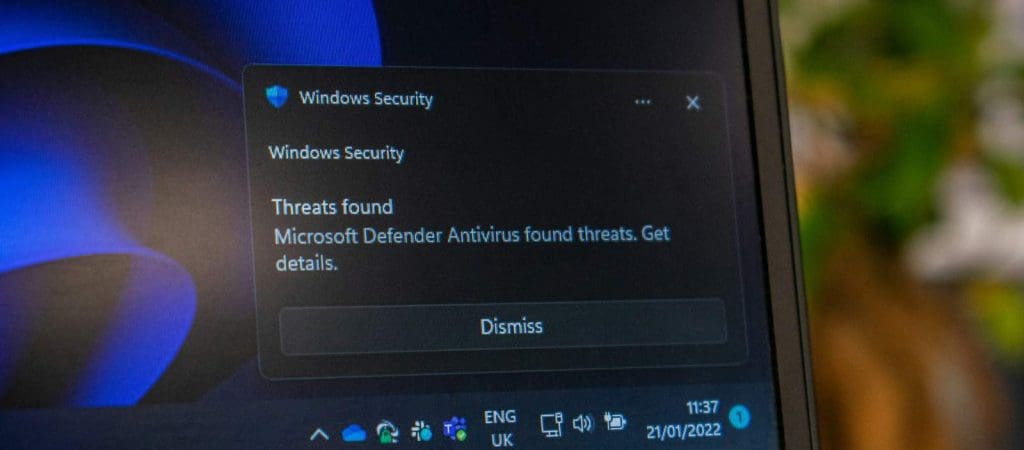
How to Remove a Trojan Malware (Horse)
Remediation is a critical stage in any cyber security attack; it’s where you align your technical team and leadership to agree on actions and escalation. There are several steps you should take to remove a Trojan horse virus from your systems, including:
Immediate steps for IT teams
When a Trojan horse virus is detected, your IT and security teams should act quickly to:
- Isolate affected systems: disconnect from the network, and restrict access to prevent lateral movement or further data exfiltration
- Contain the incident: disable accounts, stop suspicious services, and preserve any evidence (logs, memory dumps)
- Begin incident triage: identify the scope of impact (which systems, data, and credentials are involved)
- Notify stakeholders and engage your incident response partner
Tools and methods for safe removal
After containment, safe removal might involve:
- Using updated antivirus/anti-malware and EDR tools to scan and remove Trojan components
- Where rootkits or advanced Trojans are present, full system re-imaging may be required
- Ensuring all credentials and access keys are changed, network shares are reviewed, and accounts are audited
- Post-removal monitoring to verify that the threat has been fully neutralised and no persistence remains.
When to escalate to incident response experts
If any of the following apply to your business or situation, you should escalate to an incident response specialist:
- The Trojan appears to have enabled lateral movement or access into multiple systems
- Sensitive or regulated data is involved, or you suspect exfiltration
- The Trojan is part of a broader threat (e.g ransomware or advanced persistent threat)
- The attack impacts business critical systems or causes operational disruption
In these situations, you need full threat hunting, digital forensic investigation, C2 disruption, and remediation guidance.
How to Prevent Trojan Infections
Moving from reactive recovery to proactive prevention of a Trojan horse virus is vital for security leadership and risk management.
Security hygiene and user awareness
Reducing human error is a major factor in preventing infection by Trojan infections.
Key measures you should be taking include:
- Phishing simulation and training to help your staff recognise spoofed emails, fake adverts, or malicious downloads
- Enforcing strong authentication (e.g multi-factor authentication, MFA) and least-privilege access controls
- Restricting the installation of unverified software and controlling how removable media is used within the organisation.
Role of patching, EDR and access controls
From a technical standpoint, best practice includes:
- Keeping your operating systems and business-critical applications patched so you close exploitable vulnerabilities
- Deploying EDR solutions and ensuring endpoint coverage across desktops, laptops, and servers
- Segmenting your network so that a Trojan introduced into one environment cannot easily spread to the core or to high-value assets
- Applying application whitelisting or execution control policies so that only authorised software runs
How a managed SOC offers defence against Trojan malware
A managed SOC service brings continuous coverage, specialist expertise, and proactive threat hunting to your business that many in-house teams can’t maintain alone.
The discovery of RATs like Moonrise and Karsto also reinforces something important: the threat intelligence that feeds your SOC needs to extend beyond known signatures. Behaviour-based detection, sandbox analysis, and continuous monitoring are what give your team visibility when a brand-new RAT family enters the wild with no existing signatures to match.
With 24/7 real time monitoring, you gain:
- Real time visibility of attacker behaviour and Trojan activity
- Rapid detection of unusual patterns, C2 communication, or lateral movement
- Access to experienced incident response specialists who are familiar with Trojan families and how they evolve
- A partner who augments your internal team, freeing you to focus on strategic objectives while the SOC manages your detection and response
Final Thoughts: Trojan Defence in an Era of Zero-Detection RATs
The threat from Trojan malware isn’t diminishing. If anything, the events of February 2026 confirm that it’s becoming more sophisticated and harder to catch. Both Moonrise and Karsto were fully operational before a single vendor had flagged them, and both were capable of causing serious damage to any organisation that encountered them without behaviour-based detection in place.
For CISOs, IT Directors, and security leaders, the implication is clear. Signature-based defences are a starting point, not a safety net. The organisations best placed to weather a RAT infection are those with continuous monitoring, behavioural detection, and a trusted security partner who can respond rapidly when something doesn’t look right.
DigitalXRAID’s UK-based managed SOC provides exactly that: 24/7 monitoring, advanced threat detection, and incident response capability backed by CREST, NCSC CIR Level 2, and CHECK accreditations. We understand how Trojan malware threatens your operations, your data, and your compliance posture, and we’re equipped to act before a threat like Moonrise or Karsto becomes a breach.
If you’re ready to move beyond signature-based detection and build a defence that works against even the newest, most evasive threats, get in touch with the DigitalXRAID team today.
Trojan Defence with DigitalXRAID
If you want a trusted partner to help you mitigate the threat of Trojan horse viruses, here’s how DigitalXRAID can help:
How our managed SOC service stops Trojan threats in real time
Our UK-based SOC service uses advanced detection tools, threat intelligence feeds, and bespoke playbooks aligned to Trojan style attacks.
We monitor your estate continuously, track suspicious inbound files and suspicious user behaviour, identify remote access Trojan (RAT) activity, and act fast to contain any anomalies before they escalate.
Our approach means you’re not just reacting to alerts, you’re investing in prevention, detection, and containment of cyber security threats.
Speak to our experts about Trojan malware defence
Trojan horse malware is a critical threat vector for organisations of all sizes. The deception, stealth, and persistence of Trojans mean that you must have visibility, layered controls, and expert support in place.
With CREST, NCSC and CHECK accreditations, ISO aligned processes, and a commitment to safeguarding your security, DigitalXRAID is built for trust. We understand how Trojan malware threatens your operations, your data, and your compliance posture.
With proactive prevention, strong monitoring, rapid detection, and robust response, you turn the risk of Trojan malware from a worry into a managed aspect of your security posture. If you’re ready to strengthen your Trojan defence, get in touch with the DigitalXRAID team today.

FAQs About Trojan Malware
What is the meaning of a Trojan horse virus?
A Trojan horse virus, more accurately known as Trojan malware, is malicious software disguised as legitimate software. Once executed by a user, it can perform unauthorised actions such as installing a backdoor, stealing credentials, or enabling remote access.
How do you remove a Trojan virus from your system?
Remove it by isolating the affected systems, running updated antivirus or EDR scanning, potentially re-imaging systems with persistent infections, reviewing credentials and accounts, and monitoring for re-infection.
Can a Trojan be removed without an antivirus?
Technically, yes, but we strongly recommend against it. Many Trojans hide deeply or operate with elevated privileges; using antivirus/EDR, and sometimes even professional forensics, ensures you fully eradicate the threat.
What are the most common Trojan viruses today?
Common variants include banking Trojans, remote access Trojans (RATs), and droppers/backdoors. Their use continues in enterprise environments as an initial foothold, leading to data exfiltration or ransomware.
Are Trojans still a threat this year?
Yes. The discovery of Moonrise and Karsto in February 2026 confirms that RATs remain one of the most active and evolving threat types. Both were operationally capable before any antivirus vendor had flagged them, underlining that Trojan malware continues to evolve faster than signature-based defences can keep up.
What are Moonrise and Karsto RATs?
Moonrise and Karsto are two remote access Trojans identified by ANY.RUN analysts in February 2026, both carrying zero detections on VirusTotal at the time of discovery. Moonrise is a Go-based RAT capable of credential theft, remote command execution, persistence, and extensive user surveillance, including screen capture, webcam access, and keystroke logging. Karsto uses a modular architecture with built-in victim profiling, selectively activating capabilities based on the target environment while disguising its C2 traffic to evade network monitoring.
Why are Moonrise and Karsto significant for UK businesses?
Both RATs demonstrate that static, signature-based detection is insufficient against newly emerged threats. They were fully operational before any vendor alerts existed, meaning organisations without behaviour-based detection and 24/7 SOC monitoring had no automated way to identify them. For UK businesses subject to GDPR and sector-specific regulations, this represents a serious compliance and data protection risk.
How can I tell if my organisation has been infected?
Use a combination of endpoint alerts, network monitoring for unusual outbound traffic, changes to system configurations, new accounts or service execution, and log-review. If you see suspicious indicators of compromise (IoCs), you should assume potential infection.
Can a Trojan horse virus steal data?
Absolutely. Many Trojans are designed primarily for data theft: credentials, intellectual property, financial information, and more. Once inside your network, they may exfiltrate data without being detected.
What’s the difference between a worm and a Trojan horse?
A worm is self-replicating malware that spreads automatically across networks; a Trojan requires a user to install it (often via deception) and does not replicate itself.
What is a remote access Trojan (RAT)?
A remote access Trojan (RAT) is a type of Trojan malware that gives attackers long-term remote control of a system, including the ability to browse files, install further tools, monitor activity, and maintain persistence on your network.
How are Trojans delivered to UK business networks?
In UK business networks, Trojans can be delivered via phishing campaigns targeting employees, via compromised downloads, via malicious adverts, via external contractors with poorly managed devices, or via removable media uploads.
What is the difference between a Trojan virus and Trojan malware?
“Trojan virus” is a common but technically inaccurate term that people often use to refer to Trojan malware. Trojan malware (or simply Trojan) is the correct term because the software does not self-replicate like a virus; rather, it relies on deception and user execution.
How to detect a backdoor Trojan in a corporate network?
Look for unusual outbound communications, newly created accounts, services running under suspicious names, increased latency or resource usage, files dropped in uncommon locations, anomalies flagged by EDR/UEBA, or network monitoring.
When should I contact an MSSP regarding a Trojan infection?
Contact an MSSP when you suspect that intrusion has moved beyond a single system, when sensitive or regulated data may be involved, when you lack in-house monitoring or incident-response capability, or when you would prefer a rapid expert response to minimise disruption.