Microsoft Sentinel vs Microsoft Defender: What’s the Difference & Which Do You Need?
Navigating Microsoft’s extensive suite of security tools can be challenging. Many security leaders often find themselves wondering what the difference is between Microsoft Sentinel vs Microsoft 365 Defender, if they are interchangeable, or if one can replace the other.
The reality is that both tools play pivotal roles in cyber security, but each one caters to different aspects of your organisation’s cyber protection strategy. Understanding these differences will ensure that you leverage these tools effectively, maximise your Microsoft licences investment, and maintain robust security coverage for your business.
In this guide, we’ll clearly outline the distinct roles of Microsoft Sentinel vs Microsoft 365 Defender, highlight their complementary strengths, and explain why many organisations leverage both Sentinel and Defender together. We’ll also discuss the benefits of working with an expert managed security service provider (MSSP) to deploy, integrate, manage and optimise your chosen security solutions to optimise outcomes.
Key Takeaways
- Microsoft Defender is an XDR platform offering real-time protection across endpoints, identities, email, and cloud apps—ideal for Microsoft-centric environments.
- Microsoft Sentinel is a cloud-native SIEM with integrated SOAR capabilities, designed for deep threat analytics, log ingestion, and incident response across Microsoft and non-Microsoft ecosystems.
- Sentinel is built for advanced threat hunting and cross-platform visibility, while Defender excels at automated, operational protection within the Microsoft stack.
- Many organisations benefit most from using both tools together, with Defender providing rapid frontline defence and Sentinel enhancing visibility, correlation, and long-term security posture.
- Expert integration and tuning are essential to avoid data sprawl, alert fatigue, and spiralling ingestion costs—DigitalXRAID’s Managed SOC helps you unlock full value and protection.

Why the Comparison Matters
As Microsoft continues to expand its security offerings, clarity on each tool within the suite and its specific function becomes essential. With cyber threats becoming increasingly sophisticated, your organisation can’t afford to have gaps in security coverage. Additionally, with increasing scrutiny on spend and ROI from senior executives, eliminating overlapping tools or unnecessary costs is essential.
That’s where a clear Microsoft security tools comparison comes in. Understanding the differences between Microsoft Sentinel, a cloud-native blended SIEM and SOAR solution, and Microsoft Defender, a unified security solution offering Extended Detection and Response (XDR) capabilities, is critical for making an informed and strategic decision. Misunderstanding the capabilities of these closely related tools could lead to ineffective security measures and wasted resources.
What Is Microsoft Defender?
Microsoft Defender is a suite of products that includes distinct components as part of a unified security solution, including:
- Defender for Endpoint: Protects endpoints (workstations, servers, mobile devices) from malware, ransomware, and sophisticated attacks.
- Defender for Identity: Secures identities against malicious activities and insider threats.
- Defender for Office 365: Safeguards your email and collaboration tools against phishing, malware, and business email compromise.
- Defender for Cloud Apps: Provides visibility, control, and threat protection for cloud applications.
With all of these components, it becomes an integrated XDR platform specifically designed to provide threat protection across your endpoints, identities, email, and cloud applications within the Microsoft 365 ecosystem.
Microsoft Defender for Business is a separate, more cost effective packaged solution designed for small and medium enterprises that offers comprehensive device and server security coupled with Endpoint Detection and Response (EDR), next-generation antivirus, automated investigation and remediation, and the ability to track and fix vulnerabilities.
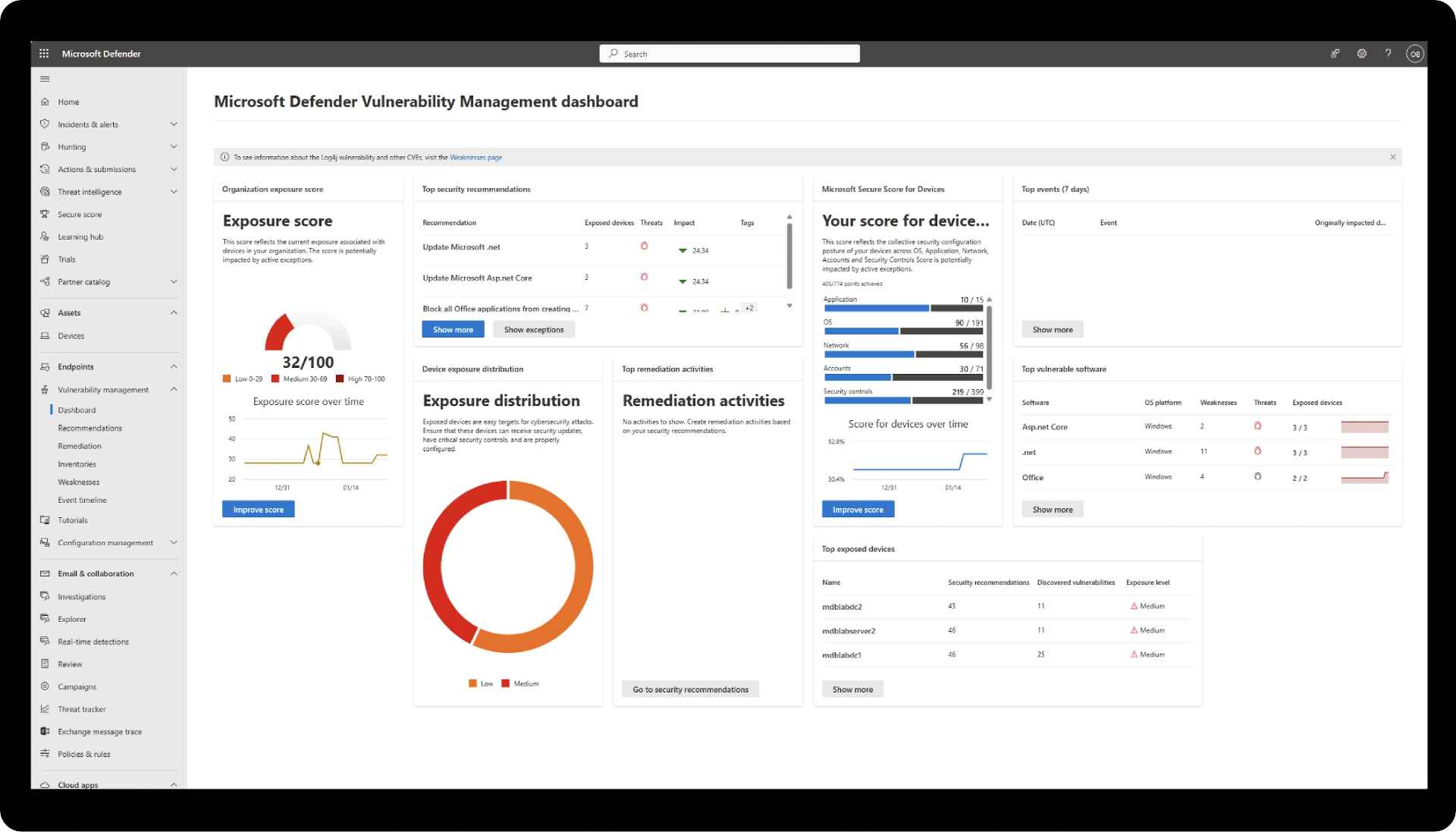
Below are some Microsoft 365 Defender features that make it stand out from its competitors.
Focused Threat Protection
Microsoft Defender excels in proactive threat protection, delivering real-time defence capabilities across your Microsoft 365 environment. Its primary strength is its ability to swiftly detect, identify, and automatically remediate threats to your endpoints, applications, and email layers.
Using Microsoft’s next generation advanced machine learning (ML) algorithms, behavioural analysis, and robust heuristic detection, Microsoft Defender rapidly identifies malicious patterns, suspicious behaviours, and known threat indicators. This allows it to immediately block or quarantine threats such as malware, ransomware, zero day exploits, or phishing attempts, significantly reducing your window of exposure and therefore the risk to your business.
Microsoft Defender is designed primarily for operational threat response rather than extensive threat hunting or forensic analysis. While it does provide EDR capabilities, including detailed attack timelines, root cause analysis, and automated remediation workflows, it doesn’t support deeper threat investigations involving extensive log correlation, custom queries, or complex forensic processes on its own.
Automatic Alert Correlation
A significant advantage of Microsoft Defender is its automatic correlation capability. It identifies and links related alerts across your various Microsoft services, significantly improving the accuracy and efficiency of your threat detection capabilities. Microsoft Defender excels in real-time protection and quick remediation but is less focused on deep threat hunting and log analytics.
What Is Microsoft Sentinel?
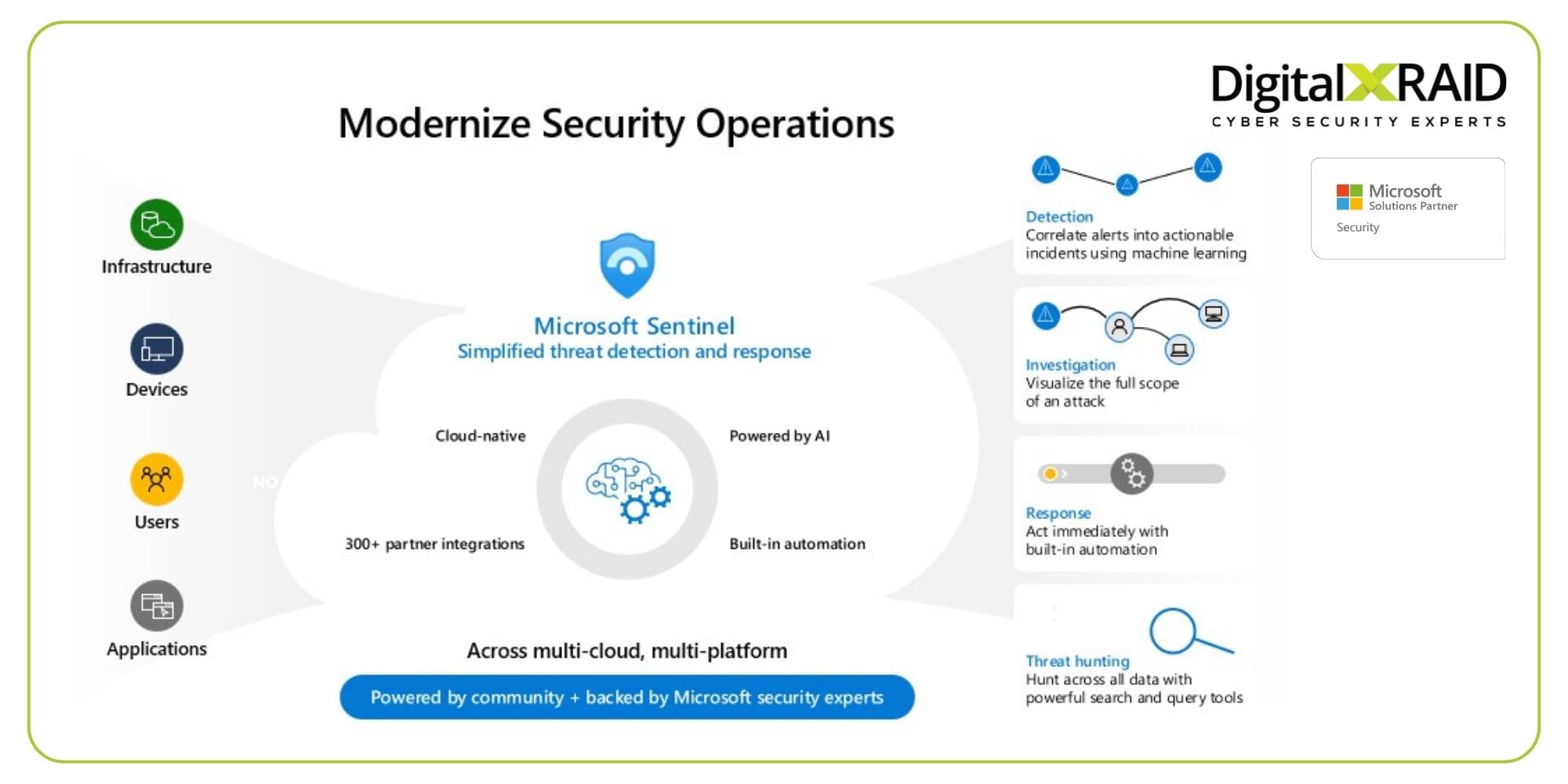
Microsoft Sentinel is a cloud-native Security Information and Event Management (SIEM) solution, integrated with Security Orchestration, Automation, and Response (SOAR) capabilities. It provides broader and deeper security visibility beyond Microsoft services alone, making it suitable for comprehensive threat analysis and incident response.
Log Ingestion from Multiple Sources
Microsoft Sentinel collects and analyses security data from across your entire IT estate. This includes Microsoft Defender logs, but also incorporates data from third party security solutions, on-premises servers, and cloud platforms such as AWS and Google Cloud if you operate in a multicloud environment.
Advanced Threat Hunting and Analytics
Microsoft Sentinel’s advanced analytics and built-in next-generation artificial intelligence (AI) and ML capabilities provide you with advanced threat hunting, which identifies threats that might be missed without the automation and filtering that the platform’s playbooks provide. With these custom analytics rules, your SOC team can proactively investigate and mitigate even the most complex cyber threats in real time.
Comprehensive Incident Response
Microsoft’s unique blend of SIEM and SOAR features enables the creation of automated incident response playbooks, streamlining and accelerating your predefined incident remediation workflows. This significantly reduces manual intervention needed from your SOC analysts and better protects your business.
Microsoft Sentinel vs Microsoft 365 Defender: Key Differences
To effectively choose between or utilise both Microsoft Sentinel and Microsoft 365 Defender, understanding their differences is crucial:
Visibility & Scope
- Microsoft Defender: A suite of security products that specifically focus on endpoints, identity, email, and applications.
- Microsoft Sentinel: Provides broad visibility across all IT environments, including non-Microsoft platforms, on-premises, and hybrid cloud infrastructures.
Data Sources
- Microsoft Defender: Ingests data from Microsoft 365 services and endpoints.
- Microsoft Sentinel: Capable of ingesting data logs from multiple data sources including Microsoft, third-party products, on-premises infrastructure, and hybrid or cloud environments.
Automation & Response
- Microsoft Defender: Automatic correlation and fast, automated responses inside the Microsoft environment.
- Microsoft Sentinel: Extensive automation and response capabilities with highly customisable and out-of-the-box playbooks that are suitable for complex incidents across multiple environments.
Licensing, Cost, and Complexity
- Microsoft Defender: Often included in Microsoft 365 licensing and has a straightforward setup process.
- Microsoft Sentinel: Consumption-based pricing that increases with data ingestion, more powerful and flexible, but requires careful deployment and management to maximise capabilities and avoid excessive costs.
Strengths in Different Organisation Types
- Microsoft Defender: Ideal for organisations that are heavily invested in Microsoft 365, who need straightforward, integrated threat protection.
- Microsoft Sentinel: Ideal for larger enterprises that require comprehensive, cross-platform security analytics and advanced threat hunting capabilities.

Why Organisations Use Both Tools Together
If you’re looking for deeper visibility into your security threats, Microsoft Sentinel will complement Microsoft Defender by providing you with a detailed log ingestion, deep threat hunting capabilities, and advanced security analytics. Microsoft Sentinel’s wider capabilities are particularly valuable if you have or want to create a proactive security team for your business that can identify and mitigate threats, even across complex or hybrid IT environments.
Microsoft Defender provides you with rapid and automated defence actions across your Microsoft ecosystem. This allows your security team to respond fast and effectively to attacks. Deeper threat hunting is best delivered when the platform is integrated with Microsoft Sentinel.
Microsoft Sentinel and the Microsoft Defender suite are best leveraged in combination, as together they deliver a much more comprehensive and multi layered security protection solution across your full infrastructure:
Microsoft-Native Synergy
Using Microsoft Sentinel alongside Microsoft Defender products gives you a completely seamless security management solution. Microsoft Defender’s alerts are automatically ingested into Microsoft Sentinel, enriching the context for security analysts and help them achieve a faster and more effective threat analysis and response.
Streamlined Alert Flow
Microsoft Sentinel consolidates data ingestion and alerts from Microsoft Defender, applying advanced analytics to reduce noise and identify high priority threats. This streamlines security operations, allowing security teams to respond promptly and decisively.
Broader Attack Surface Coverage
Microsoft Sentinel’s extended visibility across various platforms complements Microsoft Defender’s deep protection within your Microsoft environments, providing comprehensive security coverage of your entire attack surface.
Stronger Incident Response and Investigation
Microsoft Sentinel’s SOAR capabilities, combined with real-time threat protection from the Microsoft Defender suite, empowers your security team to detect, investigate, and respond to attacks immediately, which significantly reduces your time to resolution and the potential impact on your business and reputation.
How DigitalXRAID Helps You Maximise Both Tools
Navigating the complexities of Microsoft Sentinel and Microsoft Defender requires expertise and ongoing attention. DigitalXRAID provides comprehensive managed services that ensure you get the most out of both platforms:
Microsoft Sentinel and Microsoft Defender Integration Expertise
DigitalXRAID’s Microsoft, CREST and NCSC accredited and experienced SOC engineers specialise in the seamless integration of Microsoft Sentinel, Microsoft Defender and other advanced security tooling. We ensure that your instances are configured correctly from the start and provide optimised and seamless deployment, removing overlaps and maximising the complementary strengths of your security stack.
Ongoing Tuning, Correlation, and Threat Intelligence
Our experts will continuously tune your environments to reduce unnecessary data ingestion and false positives, and enhance the platform’s threat detection accuracy. Through our expert tuning we’ve been able to reduce one client’s data ingestion spend by 96% per year. We’ve also saved another client £21,400 a month through engineering to reduce data ingestion from Microsoft Defender to Microsoft Sentinel by 5TB.
We also integrate our advanced threat intelligence feeds to ensure that your tools are always up to date to defend against evolving cyber threats.
Fully Managed SOC Service 24/7/365
With DigitalXRAID’s UK based Microsoft, NCSC and CREST accredited Security Operations Centre (SOC), your organisation benefits from continuous monitoring, proactive threat hunting, and advanced, rapid response to threats across both your Microsoft Sentinel and Microsoft Defender instances. This fully managed support significantly reduces the burden on your internal resources, protects your organisation around the clock, and ensures compliance with industry standards like ISO 27001, and regulations such as DORA, NIS2 and the CRA.
Final Thoughts: Choosing One — or Combining for Maximum Coverage
Understanding the roles and capabilities of Microsoft Sentinel and the Microsoft Defender suite is essential for making strategic security decisions. While Microsoft Defender provides robust, integrated protection within your Microsoft environments, Microsoft Sentinel extends this protection across your entire organisation, including any non-Microsoft platforms and infrastructure you have in place.

If you’re a Microsoft house and looking for a place to start, you could deploy Microsoft Defender for immediate and integrated threat protection. However, as your business grows and your cyber security needs change or your infrastructure complexity increases, Microsoft Sentinel becomes critical for achieving comprehensive and proactive threat detection and response.
At DigitalXRAID, we help organisations like yours to maximise your Microsoft and security investments, reduce operational overheads, and enhance threat resilience. We can help you to choose between Microsoft Sentinel vs Microsoft 365 Defender, or implement both where necessary. If you’re looking for clarity, expert management, and a security partner you can rely on, get in touch today.